2026; Mini-Strandbeest Robot (Part II)
Updated: 6 days ago
Introduction
This is Part II of the Mini-Strandbeest series (Part I , Part III here). In this post, I go over the specific improvements made for the new version of the robot and going more into the details for the leg mechanism instead of chronicling my progress.
Changes to the design
Few updates:
Moved back to Jansen's holy numbers in mm units for the mechanism to simplify the gait and also reduce the overall scale.
Redesigned the entire mechanism in Fusion 360 for model simplicity, 3D printing ease, joint strength (mainly using M3 screws), and the good-ol parametric modelling feature that I did not know about previously (I am an ECE grad).
This week we look further into how the closed-loop kinematics is handled, and simulation speed optimizations by loosening some kinematic constraints.
Closed-Loop Kinematics in Multibody

Jansen's linkage has 1 main body (GND), 7 moving bodies (cyan), 10 "free" revolute joints (orange), and if we consider each moving body to have at least one joint, we end up with 10-7=3 independent closed loops. We have not shown the pivot axle for simplicity (where joints j4,j5 sit). Now loop 1 is obvious, between bodies b1-b2-b4-b3; loop 2 is formed wrt the main body (here called GND) passing through body b1, and loop 3 is obscure but it's the one connecting the lower body b4 to the main body GND. It can also be seen in the Multibody model below with the same color coding:

You'll note that all the joints are actually connected via revolute joints only, which is the standard design process. To actually get more details, one can look into the Simscape Statistics Viewer where you'll find the following data essentially summarising what I already discussed (in red): 7 bodies, 10 joints. But now let's go over what these other values are (which actually play a major role in the optimization process later).

There is one main simulation tree formed across the 7 bodies through 7 joints, simulating an open loop mechanism starting from the GND, giving us the main 7-DOF mechanism. Through the position of the joints and forces on each body, one can use any algorithm (for example Featherstone forward dynamics) to compute the XYZ position and XYZ rotation for each body in this tree.

Each revolute joint provides only free Z rotation that is it provides 6(full freedom)-1(Z freedom) = 5 constraints on the connected body (XYZ-trans, XY-rot). In our case, since all the joints lie on almost the same plane, all the 7 bodies also end up being constrained to this plane. That is, we have already constrained Z-trans and XY-rot for all the bodies. That is the only constraints remaining are XY-trans, which is actually easy to see form how Jansen's linkage behaves.
Since our mechanism has 3 extra joints (cut joints) remaining whose joint rotations/forces must also be satisfied, instead of adding them to the tree, they act as additional constraints on the movement of the original tree. We would assumed each of these extra revolute joints provide 5 constraints and hence a total of 15 extra constraints.
But we have already seen that the original tree already provided additional constraints that are always satisfied and only the XY-trans is what remained. Hence each extra joint can actually provide only 2 non-redundant constraints, giving us a total of 2*3 = 6 non-redundant constraints.
Now the entire mechanism had 7-DOF with 6 non-redundant constraints from the closed-loop joints, giving us 7-6=1 mechanism DOF (minimum). We call it minimum because it is possible that some of the constraints can align together in specific cases, increasing the mechanism DOF. This point will become really important when optimizing for speed.
For the states, we follow the standard dynamics equations with 14 tree states (7 position, 7 velocity or q, qdot), and 6 extra joint states (1 position and 1 velocity each) giving us 14+6=20 state vector size used to simulate the entire system.
Please note that the actual computation is purely mathematical with constraint position (as g(q)=0) and constraint forces, and this is merely an brief overview.
Multiple Legs
Now what happens when you connect multiple legs?

With 2 legs along the same crank, you get a total of 13 bodies (same crank body for both legs), 19 joints (same GND-crank joint for both legs), 6 loops, 30 constraints (6*5), 12 non-redundant, 38 states and 1 mechanism degree of freedom. This would follow same for 4 legs too with 6*4+1=25 bodies, 37 joints, 24 non-redundant constraints and 74 states. Once we include legs on the other side with an independent crank, these states and constraints on each side directly add up. Hence with 8 legs we get 24*2 = 48 non-redundant constraints, 74*2 = 148 states and 50-48 = 2 mechanism DOF which is what we expect.
Free the Body (This changes everything, definitely not clickbait)
This entire time GND was the main body of the Strandbeest that was rigidly connected to the world frame. Once we add a 6-DOF joint to this body to allow it to move freely, we get into uncomfortable territory.

We end up with -16 minimum mechanism degrees of freedom. Question: why did adding a 6-DOF joint increase the number of non-redundant constraints by exactly 24 (this equates to only 1 additional non-redundant constraint per extra joint)?
Note that this is probably not officially documented for Simscape Multibody, but we can actually deduce this from the following scenario:

We considered the previous scenario were all the leg bodies lie on the same plane.
A 6-DOF joint adds XYZ-trans and XYZ-rot degrees of freedom to the main body. We need to find out, of these which ones affect the constraints and hence require additional constraint equations to still satisfy the 3 loops for each leg.
An XYZ translation of the entire body only changes the XYZ position of all the bodies equally, so it doesn't produce any additional constraints (rotation not affected).
Now consider what happens during rotations. Firstly, any rotation would rotate all the joints by the same amount, so XYZ-rot has no effect on the rotations constraints provided by the cut joints.
But XYZ-rot can slightly affect the Z translation. A revolute joint must keep its two frames at the same Z position. When the body was fixed, this was trivially satisfied, but when the body's XYZ-rot is allowed, both frames are reached using different branches of the tree so our ODE solvers can actually come up with slightly shifted values.
For example look at the first extra joint which connects body b1 back to the crank body b6. The crank is simulated immediately because there's only one revolute there, but b1 is simulated after three joints. To ensure the Z coincidence is enforced, the solver ends up adding another non-redundant equation per extra revolute joint, giving us 1 extra constraint x 3 extra joints x 8 legs: 24 more non-redundant constraints.
We also end up with a negative mechanism DOF (minimum) which basically means that our system is overconstrained and so the solver will run multiple Newton iterations to fix all these constraints at each step, causing a huge reduction in simulation speed.
Simulation Slows Down due to Overconstraining
Before the 6-DOF joint, for 10s of simulation time at 1ms step size and ODE4 solver, we required almost 1s real-time to simulate 1 leg, 1.9s (exactly 38/20) for 2 legs, 4.3s for 4 legs, and 14s for 8 legs. Once you add the 6-DOF joint and contact forces (more about this later), it takes over 33s for the same 10s simulation which is an enormous speed reduction. Now, we did consider an increase due to contact forces, but as we will see later, these contact forces actually reduce the speed less than expected.
Remember that our system got overconstrained because the extra revolute joints are trying to enforce Z coincidence between the bodies. But geometrically this is almost always preserved anyway, so we can remove these extra constraints by adding another prismatic joint along the Z translation (or basically replace revolute with cylindrical joints). Let's see what happens when we do this:
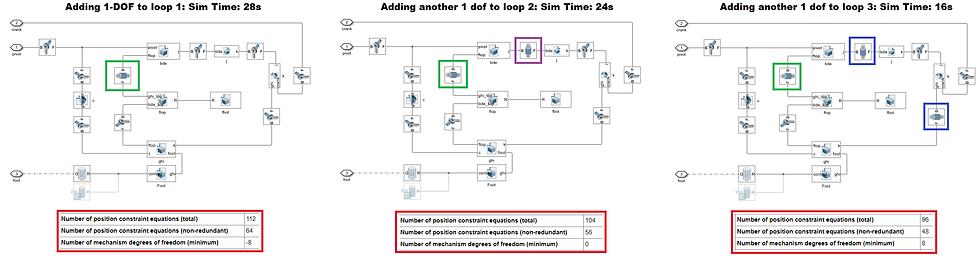
We see that as we remove these constraints by replacing with cylindrical joints, we go from -16 DOF to -8, 0 and then to 8 DOF (which is expected because of 6-DOF free joint and 2-DOF mechanism previously). Physically, we are not getting any reduction in fidelity, the state size remains the same, and the Z-constraints are trivially being satisfied due to the geometry, it's just that the solver does not know about this. By removing these extra constraints, we end up going from 33s down to 16s which is just 2s longer than without the contact forces and 6-DOF joint.
If more cylindrical joints (or other type of joints) are added, the state size increases taking up more simulation time and hence unnecessary (and also not physically correct anymore). The exact placement of the cylindrical joints are also not necessary since Simscape automatically chooses the best loops anyway.
There's actually a huge physical takeaway from this too: If we were to build the actual Strandbeest using this design with 0 tolerance for the revolute joints during assembly, we would actually end up with an overconstrained mechanism, making the movement of even the real robot extremely difficult. By using cylindrical joints (which is basically revolute with tolerance along the 3 loops), we actually end up with much free-er and better movement for the real robot too, and we also get an idea of which joints should ideally have more tolerance.
Foot Contact Proxies

Another modification was to use contact proxies instead of the cylinder geometry we used previously. Now, the speed-up isn't significant, just around 100-200ms improvement. However the main reason behind this change is due to the contact geometry limitations of full bodies (sphere, cylinder, any convex hull). I use spatial contact forces for the feet and you'll find this table in the documentation page:

It is possible to simulate the terrain only using Grid Surface, and Point Cloud (or points) are the only options to actually perform this simulation. However using singular points would've been faster but require several individual contact blocks, and hence the point cloud gives us almost a trade-off between these different options for speed and ease.
Adding Rough Terrain
Reddit user colorfl0 created this Moon Surface STL Generator that I used to download the terrain around Apollo 14 as STL. Then using MATLAB's stlreader, I convert this into a 200x200 resolution meshgrid which is then supplied to the grid surface block to simulate the terrain (not to scale of course, I need to improve this part):

This finally concludes Part II of this series since it's going longer than a 6 min read. Part III will continue with the new design and updates.
Comments